
Download WinSnap – Free Screenshot Tool for Windows, Mac, Android & iOS
WinSnap is a lightweight, efficient screenshot utility designed for users who value simplicity and speed. Whether you're capturing desktops, individual windows, or specific screen regions, WinSnap delivers crisp, clean images with minimal effort. With its intuitive interface and powerful hotkey support, this software makes screenshotting effortless across Windows, Mac, Android, and iOS devices.
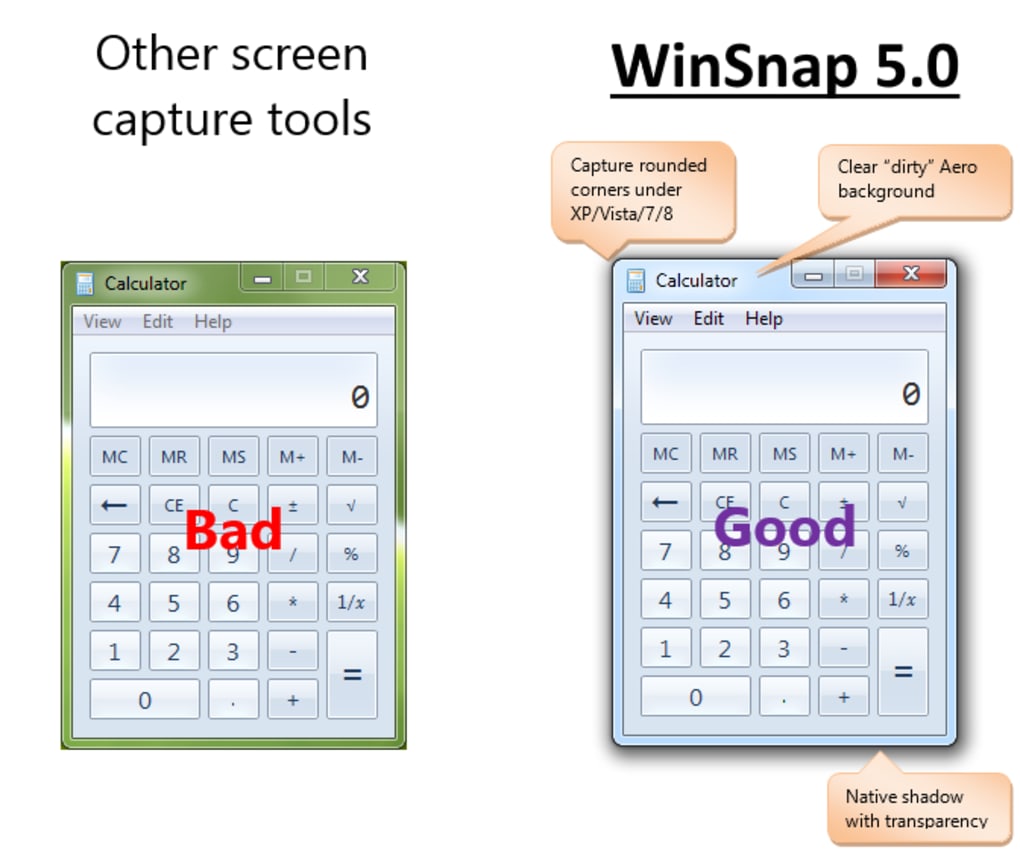
Ideal for beginners and professionals alike, WinSnap combines ease of use with essential editing tools like shadows, contours, watermarks, and preview modes. Its optimized performance on Windows 7, 8, and 10 ensures flawless compatibility, even with modern UI elements like rounded corners and transparency. The free version is fully functional, though it includes a visible watermark during trial use.
For those seeking a secure, fast, and reliable way to capture and share screen content, WinSnap is a top-tier choice.
Key Features of WinSnap
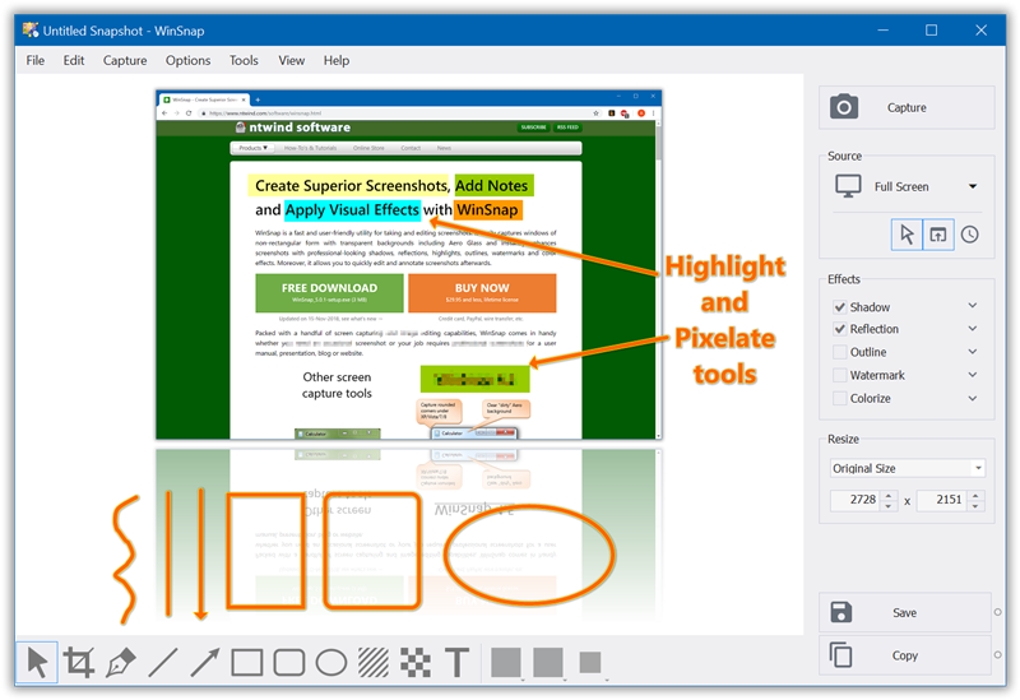
WinSnap stands out in the crowded screenshot software market thanks to its thoughtful design and feature-rich yet streamlined functionality. One of its most appealing aspects is the large preview window, which instantly displays your captured image and allows you to apply various effects in real time—perfect for visualizing how your screenshot will look before saving or sharing. This feature is especially useful for creating polished documentation, tutorials, or social media content.
Another major highlight is the comprehensive hotkey system. Users can assign custom shortcuts to capture the entire screen, active window, or a specific region with just a few keystrokes. This level of customization significantly reduces workflow interruptions and enhances productivity—ideal for content creators, educators, and support teams who take screenshots daily.
WinSnap also offers advanced configuration options such as the ability to include or exclude the cursor, set delays for capturing pop-up menus, and fine-tune visual effects like shadows, contours, and watermarks. These settings ensure your screenshots are not only accurate but also professionally styled. The software supports transparent borders and rounded window edges, making it one of the few tools that truly work well with modern Windows themes.
Additionally, WinSnap includes batch processing and auto-save features, allowing users to save multiple screenshots directly to a designated folder without manual intervention. This is a game-changer for anyone who frequently captures long sequences of screen actions, such as software demos or troubleshooting guides.
Installation & Usage Guide
Getting started with WinSnap is straightforward, whether you're using Windows, Mac, Android, or iOS. The installation process is quick and secure, requiring no complex setup steps. Simply download the latest version from the official site, run the installer, and follow the on-screen prompts. The app integrates seamlessly with your system, adding a small icon to the system tray for easy access.
Once installed, launch WinSnap and explore the clean, minimal interface. The main screen features a large preview pane, a toolbar with capture options, and a settings panel. To take a screenshot, click the “Capture” button or use your preferred hotkey. You can choose from several modes: Full Screen, Active Window, Region, or Window Border. Each mode is designed for different use cases—full screen for broad captures, active window for focused content, and region for precision.
After capturing, the image appears in the preview window. Here, you can apply effects like shadows, outlines, and watermarks. You can also crop, resize, or adjust brightness directly within the app. When satisfied, click “Save” to store the file locally or “Copy” to paste it into another application like Word, Photoshop, or email.
For advanced users, the Settings menu offers deep customization. You can adjust delay timers, enable automatic preview, set default save locations, and even disable the trial watermark (available in the paid version). The app also supports automatic updates, ensuring you always have the latest bug fixes and security patches.
Compatibility & System Requirements
WinSnap is engineered to work across multiple platforms, making it a versatile choice for users with mixed-device setups. The software is officially supported on Windows 7, 8, 10, and 11, including both 32-bit and 64-bit versions. It also runs smoothly on older systems like Windows XP and Vista, though some advanced features may be limited on legacy platforms.
For Mac users, WinSnap offers a dedicated app available via the Mac App Store or direct download. The macOS version maintains the same sleek interface and performance, with full support for Apple’s Retina displays and system-wide accessibility features.
Android and iOS users can access WinSnap through a companion mobile app, which allows remote screenshot capture from smartphones and tablets. This is particularly useful for sharing screen content during presentations or mobile troubleshooting sessions.
System requirements are modest: a minimum of 1 GB RAM, 100 MB of free disk space, and a graphics card that supports DirectX 9.0 or later. The app runs efficiently even on low-end machines, ensuring a lag-free experience.
Pros and Cons of WinSnap
- Pros:
- Lightweight and fast performance
- Intuitive interface with real-time preview
- Extensive hotkey customization
- Supports modern UI elements (transparency, rounded corners)
- Free version is fully functional (with watermark)
- Auto-save and batch capture features
- Available on Windows, Mac, Android, and iOS
- Cons:
- Trial version displays a prominent watermark
- Limited advanced editing tools compared to SnagIt or Greenshot
- No built-in cloud sync or sharing integration
- Mobile app requires separate login and setup
- Occasional bugs on very old Windows systems
Frequently Asked Questions (FAQ)
- Is WinSnap free to download and use?
-
Yes, WinSnap offers a fully functional free version that allows unlimited screenshot captures. However, the trial version includes a visible watermark on all images. To remove it, users can upgrade to the premium version.
- Can I use WinSnap on Mac and mobile devices?
-
Yes, WinSnap is available for Mac via the Mac App Store and for Android and iOS through dedicated mobile apps. These versions sync with the desktop software for a seamless cross-device experience.
- Does WinSnap support Windows 11?
-
Yes, WinSnap is fully compatible with Windows 11. It has been optimized for the latest Windows features, including rounded window corners, transparency effects, and high-DPI displays.
- How do I remove the watermark in the free version?
-
The watermark is only visible in the trial version. To remove it permanently, you must purchase the full license. The paid version removes all branding and unlocks additional features like cloud sharing and advanced editing tools.
- Can I customize the hotkeys in WinSnap?
-
Absolutely. WinSnap allows full customization of hotkeys for every capture mode. You can assign unique shortcuts for full screen, active window, region, and more, enabling rapid workflow integration.
Conclusion: Why WinSnap Is a Top Choice for Screenshot Tools
If you're looking for a reliable, easy-to-use, and secure screenshot utility that works flawlessly across Windows, Mac, Android, and iOS, WinSnap is an excellent option. Its clean interface, powerful hotkey system, and real-time preview make it ideal for beginners and professionals alike. While it may lack some advanced editing features found in premium tools like SnagIt, its simplicity and efficiency more than compensate for this.
Whether you're creating tutorials, documenting bugs, or sharing content on social media, WinSnap delivers fast, high-quality results with minimal friction. The free version is genuinely useful, and upgrading to the paid plan unlocks even more value—especially for power users and teams.
Download WinSnap today and experience the future of screenshot capture—simple, smart, and secure.







